Employee Clock In Track Time
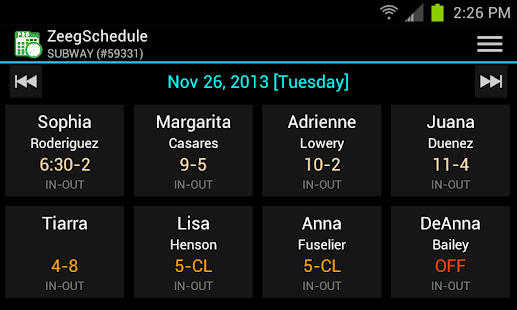
If you have more than 5 employees, try FREE version and the download PRO version.ZeegSchedule provides low cost solution for scheduling employee, tracking employee work hours, and prepare payroll hours.
Buy a tablet, install app, setup, and ready to use at your business location.
It is the first all mobile solution.
This solution is available only on Android simply because Android tablets are cheap and total cost for a solution will be less than $150 for a business location.
Most other APPs are free but requires monthly subscription to their web application.
Try our FREE version on any android device, which allows 2 business location and maximum 5 employees.
PRO version of APP allows 5 business locations and max.
25 employees per location as well as automatic synchronization across all devices linked to same account using ZeegSync.
Once you try our FREE version, we recommend to download PRO version on your personal Android device and setup all business locations including all departments, shifts, employees, and first weekly schedule.
Make sure to remember Account ID and PIN and never share this PIN to your employees.
Once all locations are configured then download on Android tablet for each location and use same account ID and PIN on registration screen so that all data from your personal device will be synchronized automatically.
Make sure that your personal Android device is connected to Network while you are setting up tablet for your business location.
Initial synchronization may take few minutes or more depending on your network connection speed and number of records to transfer.
Network connection is required for transferring data from one device to another device.
ZeegSchedule APP can be used by almost all retail or service locations such as Restaurants, Hotels, Convenience Stores, Warehouses, multiple locations within company.
FREE Version * 1 Account, Limited Business Locations (2), Limited employees (5 per location) * Single Device * FREE * Roles support (Account, General Manager, Manager, Assistant Manager, Employee) * Settings ** First day of week (default SUNDAY) ** Clock In grace period (default 10 minutes) ** Clock Out grace period (default 10 minutes) ** Regular hours per week (default 40 hours per week) ** Regular hours per day (default 8 hours per week) ** Payroll frequency (default Bi-Weekly) ** Permission (Assign employee as General Manager, Manager, and Assistant Manager for each location) ** Change Account PIN * Manage Business Locations * Manage Departments * Manage Employees * Manage Shifts * Manage Schedules (New and Change) ** Show total scheduled hours for each employee for a week ** Show total scheduled hours for each employee for a week ** Show total scheduled hours for all employees for a day ** Show total scheduled hours for employees for a week ** Show total scheduled pay for all employees for a day ** Show total scheduled pay for employees for a week * View Past and Future Schedules * Employee Clock-In and Clock-Out * Track employee work hours * Track employee loan * Prepare payroll hours and share via email * Payroll amount calculated using exemption status, regular hours, and over time (OT) hours
PRO Version * 1 Account, Limited Business Locations (5), Unlimited employees * Multiple Devices, Automatic data synchronization across all devices
ENTERPRISE VersionPlease, contact us for customized solution.
NOTE: Data synchronization is between devices.
If you uninstall APP from all your devices then you will loose all your data.
Initial synchronization after registration will bring schedules for last 6 months only.
About Employee Clock In Track Time
- Package name (App ID)
- com.zeegbee.zeegschedule.pro
- Available on
- Google Play
- Price
- Free
- Version
- v2.3
- Developer
- Tragging
Looking for the Employee Clock In Track Time APK?
The safest way to get Employee Clock In Track Time (com.zeegbee.zeegschedule.pro) on your Android device is to install it directly from Google Play — you'll always get the latest official version, automatic updates, and no risk of modified or infected APK files from third-party sites.
Social Features
Connect and share with friends and the community.
Learning Tools
Enhance your learning experience with interactive features.
Travel Features
Plan and manage your travels with ease.
See Employee Clock In Track Time in Action


Frequently Asked Questions
Is Employee Clock In Track Time free?
Yes, Employee Clock In Track Time is free to download and install on Android through Google Play.
How do I install Employee Clock In Track Time on Android?
Open Google Play on your Android phone or tablet, search for Employee Clock In Track Time by Tragging or tap the Google Play button on this page, then tap Install. The app downloads and installs automatically.
What is com.zeegbee.zeegschedule.pro?
com.zeegbee.zeegschedule.pro is the App ID (package name) of Employee Clock In Track Time on Google Play. Every Android app has a unique package name, and it is the safest way to verify you are installing the official app.
Is Employee Clock In Track Time safe to download?
Installing Employee Clock In Track Time from Google Play is the safest option: you get the official version published by Tragging, verified by Google Play Protect, with automatic updates. Avoid APK files from unofficial third-party sites.
Get Employee Clock In Track Time Today
Employee Clock In Track Time for Android — free download on Google Play.
Compatible with Android phones and tablets — available on Google Play.
Ask AI about this app
Get instant answers about features, tips and more from popular AI assistants.